
About this feature
Clubs are UNILinkd's community spaces. Each one is an interest-based board for your entire institution, similar to a university-wide Reddit (Coding Club, Photography Society, Debate Club, and so on). Only Faculty can create clubs. Once created, anyone can discover and join them. Members can post and comment depending on the club's settings. Each club is run by its admins: the faculty member who created it and up to four moderators they appoint. Club admins control permissions, moderate posts, and pin important posts as Community highlights at the top of the club. All club posts expire automatically after 6 months.
How to Manage All Highlights (Club Admins)
See, open, and remove every highlight of your club in one place.
In the club, tap ⋮ at the top-right and choose "Settings". Scroll to the "Highlights" section. Its title shows how many of the 10 slots are used.
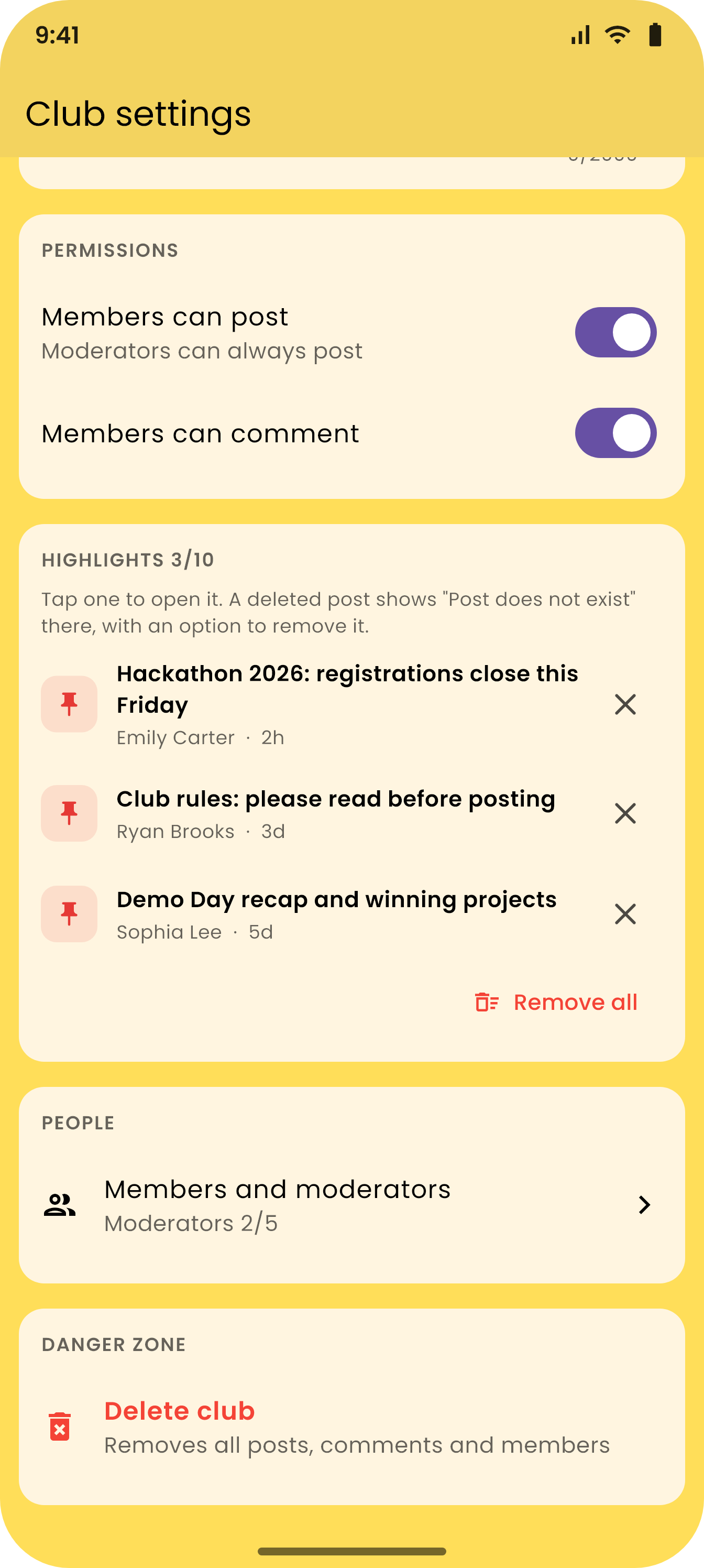
Each highlight shows its title and, where available, who posted it and when. Tap one to open the post.
Tap ✕ next to a highlight to remove it, or "Remove all" to clear every highlight at once (you will be asked to confirm). Removing a highlight only unpins it; the post itself stays in the club.
When a highlighted post is deleted, by its author or a moderator, or when it expires after 6 months, its highlight is removed automatically. You only need to clean up highlights that point to posts deleted before this feature was available.
You've completed this guide — How to Manage All Highlights (Club Admins)